Details
-
 Technical task
-
Status: Closed (View Workflow)
-
 Major
Major
-
Resolution: Fixed
-
N/A
-
None
Description
1. We need to build on all OS versions in the engineering policies
RHEL 8,9,10
Rocky Linux, AlmaLinux 8,9,10 - but testing rhel packages on them would been enough
Debian 11,12,13. I'll ask about 10 it's still in policy(while 12 is actually not)
Ubuntu 22.04, 24.04, currently supported short term.
SLES 12,15
All of them on both X86_64 and ARM64
Windows - both 32 and 64bit. If windows on ARM is available - would be good
MacOS x86_64 if available
In all buildbot we build and test also on couple of latest Fedora's(currently it's 38 39 there but I'm not sure if they are still latest)
2.Dependencies
Not much. on Linuxes it's UnixODBC. and OpenSSL for tarball builds - for tarballs we. On Windows there is nothing for build, but for packaging we need WixTools - latest version that is still open source will do. On MacOS - it's iOdbc and OpenSSL(from homebrew, macos has only ancient versions)
3. Building & testing steps
Building is described here or here Former is probably better but maybe some bits of info in latter, too.
I only think that
cmake -DCMAKE_BUILD_TYPE=RelWithDebInfo .
|
cmake --build . --config RelWithDebInfo
|
should suffice to build everywhere as all options defaults should be as all those instructions show.
You can also look at [github actions workflow
| https://github.com/mariadb-corporation/mariadb-connector-odbc/blob/master/.github/workflows/ci.yml] To get idea of how configure and run tests. |
But it would better to look at all buildbot builder step scripts.
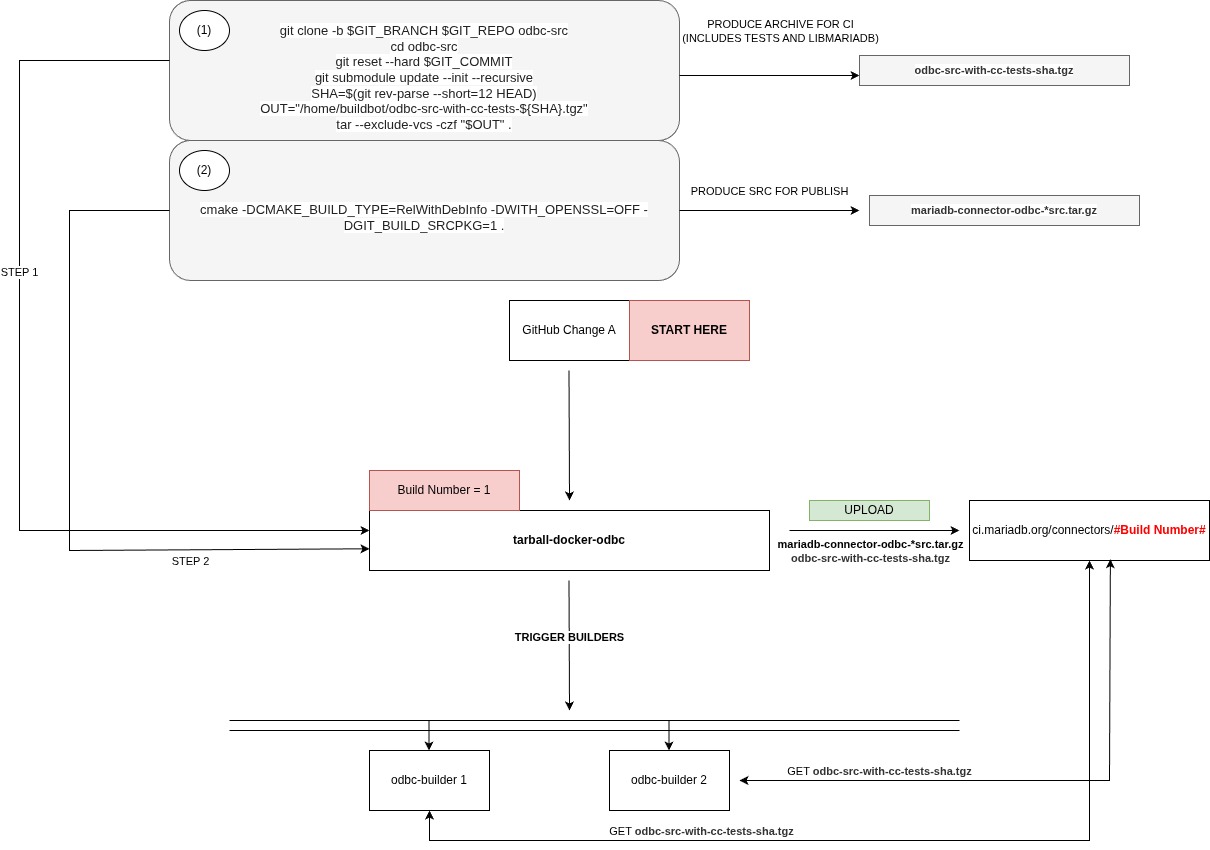
Steps are slightly different for tarballs and rpm/deb builders. For tarballs it's
1) checkout + setting testing environment(cmake generates odbcinst.ini and odbc.ini to r
2) cmake config
3) build
4) run mariadb server
5) run tests using ctest
6) uploading packages
For rpm
1) same + rm libmariadb subdir in source + intallation of C/C binaries using package manager
2) cmake additional options -DRPM=On -DCPACK_GENERATOR=RPM -DMARIADB_LINK_DYNAMIC=On -DPACKAGE_PLATFORM_SUFFIX=$HOSTNAME
But -DPACKAGE_PLATFORM_SUFFIX=$HOSTNAME worked in old buildbot - will probably need to be smth else
3) same + build or source package
if grep -qw CPACK_RPM_SOURCE_PKG_BUILD_PARAMS CPackSourceConfig.cmake; then
# cmake --build . --target=package_source
make package_source
fi
4) 5) after that we copied all packages and ini filese to the host machine and fired clean vm, copied all that there installed and run tests including testing of source rpm with rpm build
6) the same
For DEB
2) cmake -DDEB=On -DCPACK_GENERATOR=DEB -DCMAKE_BUILD_TYPE=RelWithDebInfo -DMARIADB_LINK_DYNAMIC=On -DPACKAGE_PLATFORM_SUFFIX=$ID$VERSION_ID -DCMAKE_CXX_FLAGS_RELWITHDEBINFO="-L/usr/lib/x86_64-linux-gnu -I/usr/include/mariadb" """ + cmake_params + """ ../src
Probably cmake can already find c/c libs und includes w/out hints - i remember fixing that, but not sure
The rest of scenario is more or less the same but w/out source packages
WIndows:
32b and 64 bit builds are needed. For 32b - -A"Win32"
Then one need to install msi and either use predefined DSN's or create DSN's the way it is done in github actions
Macos:
More or less the same as linux. I'll write later if it is needed
The best way would be to consult old buildbot scripts. I can provide them if you don't have access to its config